Claude Desktop
Supported. Setup takes about two minutes.
An open-source MCP server for Housecall Pro, a small program that lets Claude and other AI assistants read your account. It runs on your machine with your own API key, and it is free forever: it is how we introduce ourselves, not a trial.
The quickest way in is to let your assistant do it. Copy the setup prompt, paste it into Claude, and it walks you through
the API key and connects itself. If you would rather run it yourself, the command is
npx housecall-pro-mcp and the per-client steps are below.
MCP, the Model Context Protocol, is the standard way an AI assistant plugs into an outside system. This is a small program that speaks MCP on one side and the Housecall Pro API on the other, so you can ask questions in your own words instead of writing code against a REST API.
One naming note, because the same thing has two names. Claude and ChatGPT both say connectors inside their own settings screens, so that is what you will be clicking when you install this. Everywhere else, including MCP registries and anyone asking whether a tool exists for a given system, it is an MCP server. Same thing, and this site uses MCP because that is the word people search for.
It is the wiring, not the work. It will answer whatever you think to ask, which is exactly its strength and exactly its limit. The skills are what know a whole job well enough to run it the same way every time.
Most of the value is in the things it quietly gets right. Each of these has caused a real wrong number somewhere:
| Behaviour | Why it matters |
|---|---|
| Money in both directions | The API speaks integer cents. Reads come back as dollars, writes take dollars and convert. A tool that passes raw cents mis-bills by a factor of a hundred. |
| The status vocabulary | You filter with one set of words and get another set back. Job rows carry a normalised bucket so a check for completed work actually matches completed work. |
| Date windows that work | The invoice date filters are accepted and ignored. The MCP walks pages and filters client-side, so a date range means what you asked for. |
| Deleted rows kept out of totals | Deleted jobs stay in list responses with their full amounts. Every job row surfaces its deleted marker so revenue is not silently inflated. |
| The right paths | Several capabilities live in a different namespace than the obvious one, which is why other tools report them missing. The MCP points at the routes that answer. |
| No blind retry on a failed write | A retried write is how you get two of something. Reads retry; writes do not. |
Several Housecall Pro MCP servers exist. See how they compare by how many of the routes they call actually work, the number that decides whether a tool answers or fails in front of a customer. Ours is the only one at zero dead routes.
The MCP runs on your own key, and the key never passes through us. Generating one takes about a minute. API access is a MAX-plan feature, so if you are on Basic or Essentials there is no key to generate and no way to buy one separately. The free export skill needs no key at all and works whatever plan you are on, so that is the route instead.
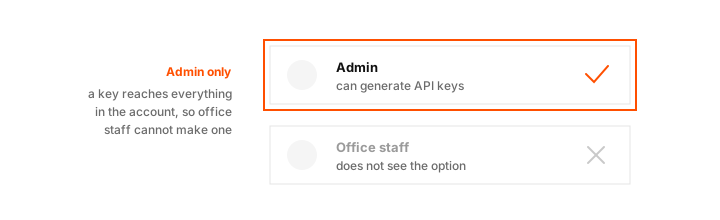
Log in to Housecall Pro. Only admin users can generate API keys, so an office staff login will not show the option. That is deliberate on their side: a key reaches everything in the account.
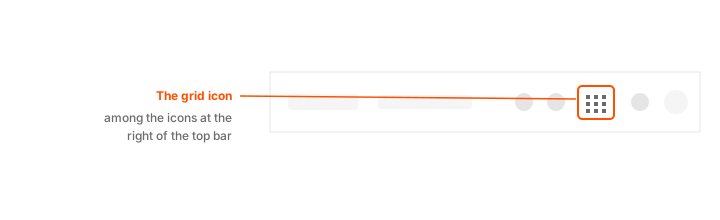
Click the My Apps button, the grid icon in the top bar.
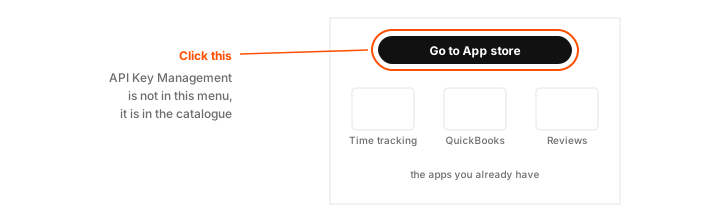
Click Go to App store. The My Apps menu lists a subset of your apps rather than the whole catalogue, so API Key Management will usually not be sitting in it already.
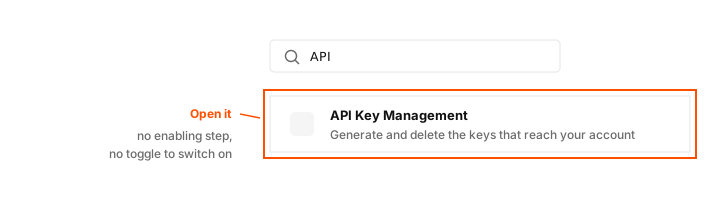
Search for API and open API Key Management.
Or go straight to the API Key Management page
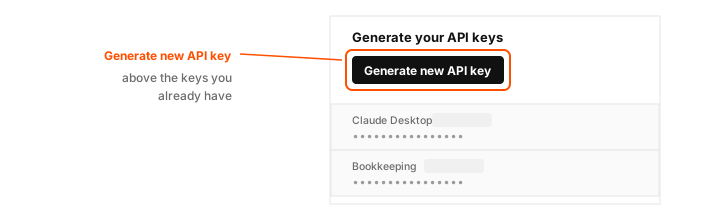
Click Generate new API key. It sits above the keys you already have.
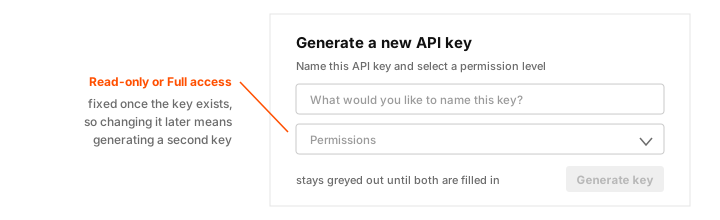
The dialog asks for both, and the Generate key button stays disabled until it has them. Name it for the thing that will use it, so a key you later want to revoke is the one you can identify. Then click Generate key.
Housecall Pro keeps the key visible here afterwards, so you can come back and copy it again. What you cannot do is edit a key: to change its permission level you generate a new one and delete the old.
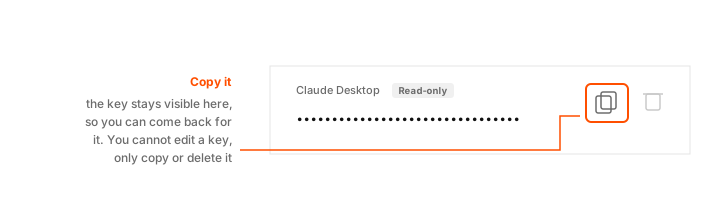
The figures above are drawings, not screenshots of a live account. Housecall Pro shows every existing key in full on that screen, so a real capture of it would publish working credentials.
Read-only covers reporting, lookups and exports. Nothing in your account can be changed, whatever anything asks for. Full access additionally allows creating customers, jobs and estimates, scheduling work and tagging.
Read-only is the right default. Pick it unless you specifically want your assistant to be able to make changes, and remember the level is fixed once the key exists: changing your mind means generating a second key, not editing the first.
The quickest way is to let your assistant do it. Copy the prompt below, paste it into whichever assistant you use, and it handles getting a key and then sets itself up.
Help me connect my Housecall Pro account to you using the free hcpapi MCP server.

1. Walk me through making an API key. In Housecall Pro: My Apps, then Go to App store, then API Key Management, then Generate new API key. It needs the MAX plan and an admin login. Tell me to pick Read-only unless I say I want you to make changes.

2. Then connect yourself to it. The command is npx, the arguments are -y housecall-pro-mcp, and my key goes in HCP_API_KEY. If you can edit your own config, do it. If you cannot, tell me exactly what to paste and where.

3. Then check it worked by asking my account one simple question.

Full guide: https://hcpapi.com/mcp/#key
Supported. Setup takes about two minutes.
Supported. Setup takes about two minutes.
Supported. Setup takes about two minutes.
Supported. Setup takes about two minutes.
Not compatible with a local MCP server. The page explains why, and what to use instead.
Using a different app works the same way. Almost anything that supports MCP asks for the same
three things, whatever it calls them: the command is npx, the arguments are
-y housecall-pro-mcp, and your key goes in a setting named
HCP_API_KEY. If that sentence means nothing to you, use the prompt above instead
and let the assistant fill them in.
Because it is how we introduce ourselves. This is plumbing, and plumbing everybody should have is a poor thing to put behind a paywall. It is free, MIT-licensed, the source is on GitHub, and no paywall arrives later.
What we do sell is the layer above it: skills that run a whole job the same way every time, and a hosted backend for what this cannot reach. Questions about either go to hello@hcpapi.com.